
What Is an AI Receptionist? How Robot Front Desks Work
What is an AI receptionist, and what changes when the receptionist has a physical presence?
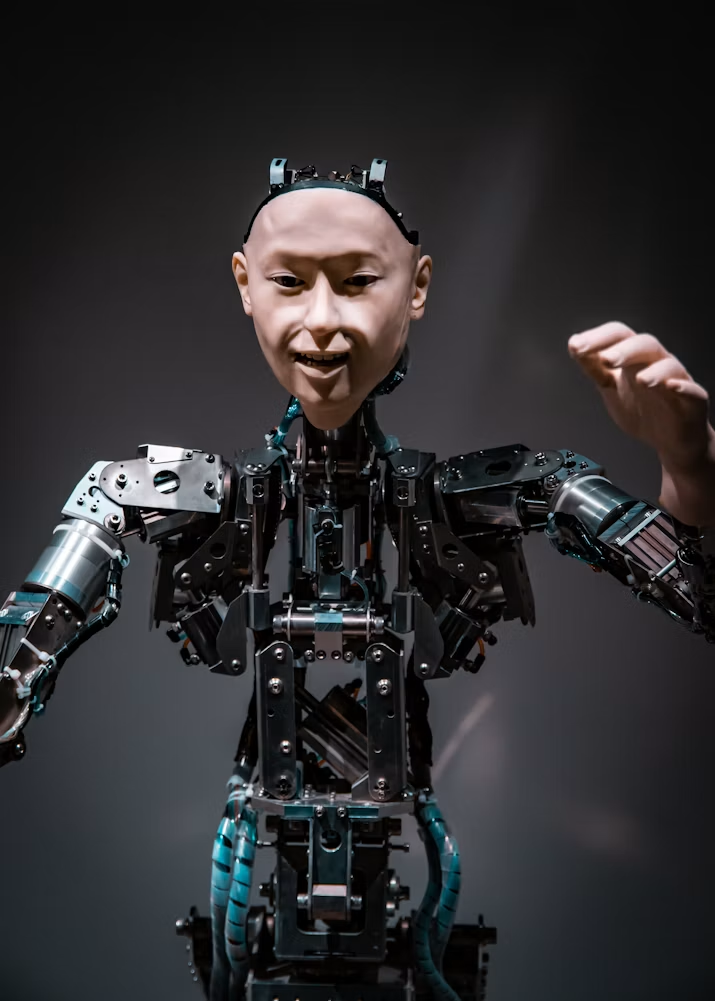
An AI receptionist is a conversational system that welcomes visitors, answers routine questions, supports check-in, books or confirms appointments, and connects people with the right human team member. A robot receptionist adds an embodied interface: a face, gaze direction, expression, voice, and physical position in the lobby. That presence can make an automated service easier to find and more intuitive to approach.
The strongest implementations do not try to remove people from hospitality. They handle predictable front-desk steps while making escalation obvious. For organizations exploring lifelike, interactive front-desk experiences, Mimic Androids develops human-centered android concepts using digital humans, conversational AI, simulation, motion capture, and real-time behavior design.
Table of Contents
- What is an AI receptionist?
- How does an AI receptionist work?
- Robot versus virtual receptionist
- Tasks and useful applications
- How to plan a deployment
- Trust, privacy, and accessibility
- Frequently asked questions
- Design the right front desk
What Is an AI Receptionist?
An AI receptionist is a software-led front-desk agent that communicates through speech, text, or both. Unlike a traditional telephone menu, it can interpret a natural request such as “I am here to meet the research team” and decide which approved action should follow. Depending on the deployment, that might mean finding a host, issuing check-in instructions, answering an opening-hours question, or creating a support request.
Conversational AI typically combines speech recognition, natural language processing, dialogue management, and response generation. IBM’s explanation of conversational AI describes how NLP and machine learning help systems recognize speech or text and translate meaning into a useful response. The reception layer then connects that conversation to controlled business tools such as a directory, calendar, ticketing system, or visitor-management platform.
An AI receptionist should therefore be understood as a service workflow, not merely a talking screen. Its value depends on the knowledge it can access, the actions it is permitted to take, the reliability of its integrations, and the quality of the handoff when a request needs a person.
Mimic Androids extends this model into physical interaction. Its android solutions include concepts for AI receptionists, brand hosts, education guides, healthcare support, retail assistants, and research prototypes.
How Does an AI Receptionist Work?
A visitor sees or hears a welcome prompt and speaks, types, or selects an option. The system converts the input into a structured intent, checks relevant information, performs an approved action, and produces a response. In a physical android, that response may coordinate voice with eye contact, facial movement, gesture, and timing.
- Detection and invitation: The system recognizes that someone has approached or waits for an explicit touch or voice prompt. Good design avoids surprising people or implying that passive observation is required.
- Input: Microphones, a touchscreen, or another accessible control captures the request. Speech recognition turns audio into text when voice is used.
- Intent and context: Natural language understanding identifies the goal and relevant details. “I have a 10:30 appointment with Maya” contains a check-in intent, a time, and a host name.
- Knowledge and action: The receptionist retrieves an approved answer or calls a limited workflow, such as notifying the host. It should not receive unrestricted access to internal systems.
- Response behavior: The system answers in concise language and, in an embodied design, coordinates gaze, expression, and pauses. Mimic Androids’ work in human-centered android interaction focuses on the subtle behaviors that shape whether an exchange feels clear and appropriate.
- Handoff and logging: Low-confidence or sensitive requests move to a person. Operational logs record only what is necessary for service quality, security, and troubleshooting.
This sequence can happen in seconds, but each layer needs explicit decisions. A polished face cannot compensate for an inaccurate directory, confusing escalation, or slow response time.
Robot Receptionist vs. Virtual Receptionist: What Is the Difference?

“Virtual receptionist” is a broad term. It can describe a remote human answering service, a voice agent on the telephone, a web-based avatar, or an automated kiosk. A robot receptionist is physically present at the location and communicates through an embodied interface.
A voice-only AI receptionist is well suited to inbound calls. A screen kiosk is efficient for forms, badges, and wayfinding. A digital human can support expressive video or touchscreen conversations. An android concept can combine conversation with physical presence, gaze, facial expression, and spatial cues. The right format depends on the environment and the job—not on which technology appears most futuristic.
Embodiment is most useful when presence itself carries value. A visible host can establish a recognizable arrival point at a showroom, event, innovation center, hotel, education space, or research lab. It may also embody a brand character consistently across repeated interactions. Explore the underlying digital-human and android capabilities, from robotic face concepts to conversational integration and prototype direction.
There are also additional responsibilities. People interpret faces and voices socially, so expression, personal space, attention, and timing must be designed carefully. The android should never pretend to possess human understanding it does not have. Clear disclosure and an easy path to a staff member help set honest expectations.
What Can an AI Receptionist Do, and Where Is It Useful?

A practical AI receptionist begins with a narrow task list. Common tasks include greeting visitors, answering location and opening-hours questions, confirming appointments, notifying hosts, giving directions, explaining a queue, collecting limited check-in details, changing language, and transferring complex requests.
The best first tasks share three qualities: they happen frequently, have clear answers, and are easy to escalate. Organizations should avoid starting with decisions that carry legal, medical, financial, employment, or safety consequences.
- Corporate and research spaces: Welcome scheduled visitors, locate teams, explain site rules, and notify hosts.
- Retail and brand environments: Introduce products, guide guests to departments, or bring a campaign character into the physical space.
- Hotels and hospitality: Support directions, amenity questions, queue triage, and multilingual arrival information while staff handle nuanced service.
- Education: Guide learners, answer approved campus questions, and demonstrate human-robot interaction. Mimic Androids’ article on the NAO robot in education and modern AI tutors examines lessons from an established social-robot platform.
- Healthcare training and wellness settings: Provide navigation or simulation support without replacing clinical judgment or collecting unnecessary health information.
- Events and exhibitions: Deliver consistent introductions, schedules, directions, and brand storytelling at high-traffic moments.
Mimic Androids uses 3D simulation and virtual-environment testing to explore behavior before physical rollout. This is especially valuable when teams need to test queues, viewing angles, interaction distance, noise, lighting, and handoff routes.
How Should You Plan an AI Receptionist Deployment?

Start with the experience, not the hardware. Observe the current arrival journey: where people hesitate, which questions repeat, when staff are interrupted, and where visitors need reassurance. Define one measurable service outcome, such as faster host notification or more consistent after-hours guidance.
- Define users and setting. Include visitors with different languages, heights, hearing, vision, mobility, confidence, and familiarity with AI.
- Choose bounded tasks. Document what the receptionist can answer, what it can change, and what it must refuse or escalate.
- Map the conversation. Write short answer-first responses, clarification prompts, recovery language, and a visible human-help option.
- Select the interface. Decide whether voice, touch, a digital human, an android face, or a combined interface fits the location.
- Prototype behavior. Test gaze, expression, speaking pace, silence, distance, and turn-taking—not just the words. The simulation and testing capability supports scenario validation before deployment.
- Integrate minimally. Give each workflow only the data and permissions it needs. Use separate service accounts, audit trails, and safe failure modes.
- Pilot with staff present. Track completion, handoff, misunderstanding, abandonment, accessibility barriers, and visitor feedback.
- Review continuously. Update knowledge, remove poor workflows, inspect incidents, and retest when models or integrations change.
The business case should account for design, content maintenance, integrations, supervision, connectivity, physical upkeep, and human coverage—not only the initial device price. A pilot is successful when it improves the arrival experience and gives staff better control, not merely when the system completes many conversations.
How Do You Build Trust, Privacy, and Accessibility?
Reception areas are shared spaces. Visitors may not know what the system senses, records, or retains, so transparency must be immediate. A short notice should explain that the receptionist uses AI, what inputs are active, why information is requested, how long it is retained, and how to choose human assistance.
Risk management should cover the full lifecycle. The NIST AI Risk Management Framework organizes this work around govern, map, measure, and manage. For a front-desk system, that means assigning responsibility, documenting the intended use, testing performance and failure modes, monitoring incidents, and maintaining a way to disengage the AI safely.
Privacy design should minimize collection. Ask only for information needed for the immediate workflow, restrict access, protect it in transit and at rest, establish deletion periods, and avoid using reception interactions for unrelated profiling. The NIST Privacy Framework provides a voluntary structure for identifying and managing privacy risk.
Accessibility requires more than captions. Offer alternatives to speech, readable contrast, adjustable volume, sufficient response time, reachable controls, clear focus order, plain language, and a non-digital path. Test with real participants and do not assume one interface works for everyone.
Finally, design graceful limits. The receptionist should say when it is uncertain, avoid inventing policies, repeat or rephrase when asked, and transfer to a person without forcing the visitor to restart. Mimic Androids describes its broader approach as custom, simulation-first, and collaborative; learn more about the company’s human-centered development philosophy.
Frequently Asked Questions
What is an AI receptionist?
An AI receptionist is a conversational front-desk system that welcomes people, answers approved questions, supports routine check-in or booking tasks, and hands complex requests to staff.
Is an AI receptionist the same as a chatbot?
No. A chatbot is one possible conversational component. An AI receptionist combines conversation with front-desk knowledge, controlled integrations, service workflows, escalation, and sometimes a physical or digital-human interface.
What is a robot receptionist?
A robot receptionist is an automated front-desk agent with a physical presence. It may use voice, a screen, gaze, facial expression, or gesture to guide an in-person interaction.
Can an AI receptionist replace a human receptionist?
It can handle repeatable tasks, but complete replacement is rarely the best design goal. Human staff remain essential for exceptions, empathy, sensitive decisions, safety, and relationship-based service.
Can an AI receptionist book appointments?
Yes, if it has a secure, limited calendar integration and clear rules for availability, confirmation, changes, and escalation. It should expose only the minimum information needed.
Does an AI receptionist work in multiple languages?
It can, but each supported language needs testing for speech recognition, terminology, names, accents, response quality, and handoff—not merely automated translation.
What happens when the AI does not understand a visitor?
It should ask one concise clarifying question, offer touch or text alternatives, and make human assistance easy. Repeating the same failed prompt is poor recovery design.
How do you protect visitor privacy?
Use clear notice, data minimization, restricted permissions, encryption, retention limits, audit logs, and a human alternative. Requirements should be reviewed for the deployment’s jurisdiction and context.
Which industries can use robot receptionists?
Potential settings include corporate offices, hospitality, retail, exhibitions, education, research, healthcare training, and innovation centers—provided tasks and risks are scoped appropriately.
Design the Right Front-Desk Experience
An effective AI receptionist is not defined by how human it looks or how many features it lists. It succeeds when visitors know how to begin, receive accurate help quickly, understand its limits, and can reach a person without friction. A physical android can add presence, expression, and memorable brand character—but only when behavior, workflow, privacy, accessibility, and operations are designed as one system.
Mimic Androids brings together digital-human creation, robotic face concepts, conversational AI, expression systems, motion capture, and simulation-led testing. Review more android technology insights, or contact Mimic Androids to discuss an AI receptionist, robot brand host, research prototype, or simulated interaction concept.